Start Your Electric Toothbrush Project
Tell us your product requirements and target market. We will review the details and reply with the relevant next steps.

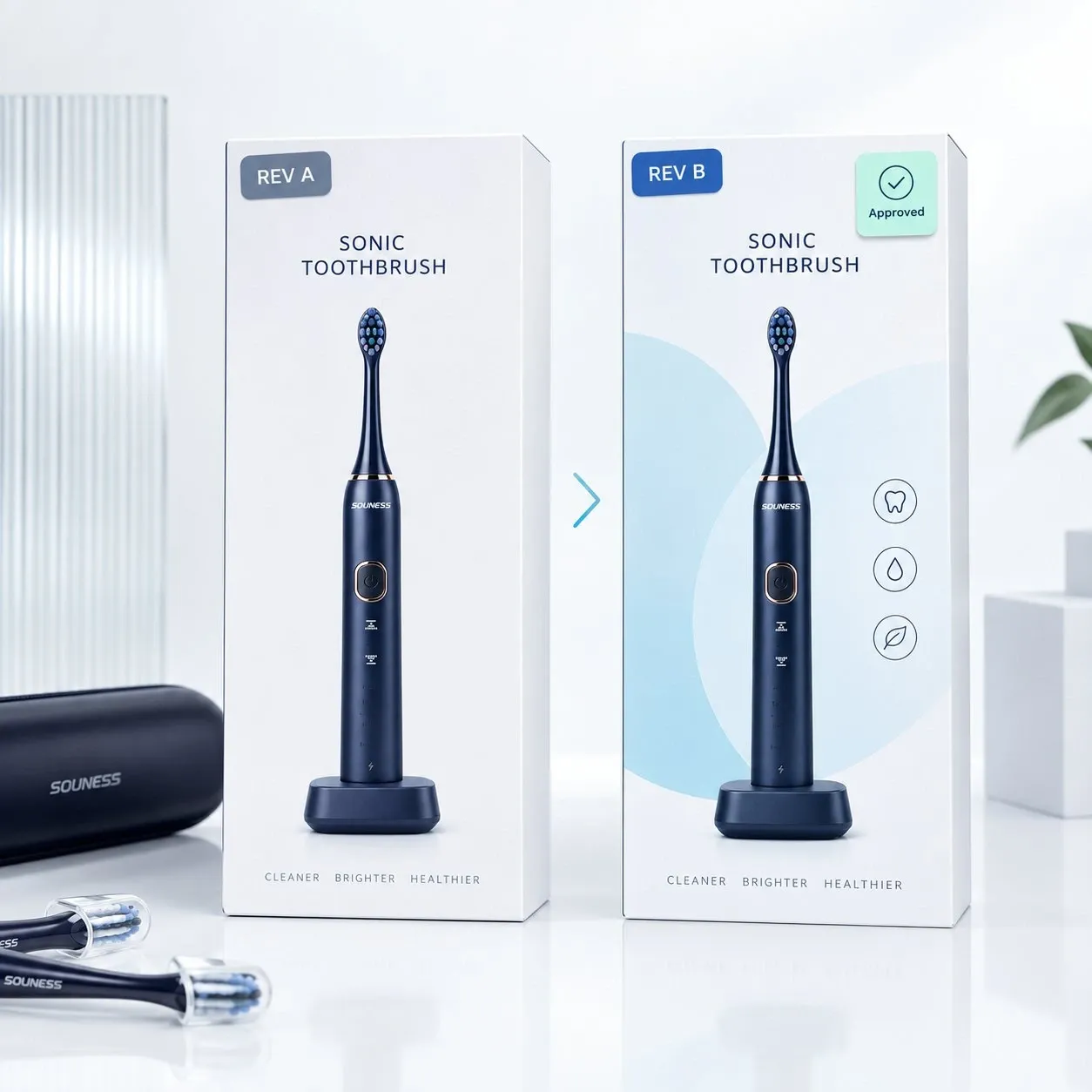
A packaging file is not permanently “finished” after the first production run.
Later orders may involve changes to the product specification, battery performance, charging method, firmware functions, included accessories, brush-head compatibility, barcode, target market or master-carton configuration.
If those changes are not connected to an identifiable packaging revision, an apparently small update can result in outdated claims, incorrect accessories, mixed packaging stock, rework or shipment delays.
For repeat OEM orders, packaging should therefore be controlled as part of the approved product configuration rather than managed as “the same artwork as last time.”
During the first order, packaging normally receives close attention.
The buyer and supplier are actively reviewing:
Repeat orders create a different risk.
Once the first production run has shipped successfully, everyone may assume the previous packaging remains correct.
But the product may have changed.
Examples include:
The biggest risk is usually not poor graphic design.
It is technically outdated packaging being used for a current product configuration.
Packaging files should be identifiable without opening them.
File names such as:
final.pdffinal-new.pdffinal-approved.pdflatest-version.pdfdo not tell the factory which product, market or approved revision they belong to.
A practical file name can identify:
For example:
SN903S-US-RETAILBOX-REV-B
This is only an example naming convention, not an industry standard.
The useful principle is simple:
A production packaging file should be identifiable before anyone opens it.
Where practical, the same revision should also appear in the artwork approval record, packaging-sample record or production-release communication.
Several identifiers can apply to the same product.
They should not be treated as interchangeable.
| Identifier | What It Controls |
|---|---|
| SKU | Commercial sellable variant, such as color, bundle, pack quantity or customer program |
| Product Revision | Technical product configuration |
| Artwork Revision | Printed copy, graphics, claims, barcode and market information |
| Structural Packaging Revision | Dieline, dimensions, insert, tray, sleeve, material or assembly |
| Pack-Out Revision | Units per carton, orientation, dividers, master carton and pallet pattern |
These revisions may change independently.
For example, the same SKU may receive a different battery while the external appearance remains unchanged.
That is a product-configuration change.
If the retail box contains a runtime or charging claim, the packaging should then be reviewed to determine whether the artwork also needs to change.
The opposite can also happen.
The hardware may stay unchanged while the product enters a new market with a different:
In that case, the packaging revision may change while the core product remains the same.
A material product change should trigger an artwork-impact review.
That does not mean every change automatically requires new artwork.
It means the buyer checks whether the existing packaging still matches the product.
Review packaging when a change may affect:
Review packaging when a change affects:
Review packaging when a change affects:
Review packaging when a change affects:
Also review the relevant packaging records when a change affects:
The goal is not to create a new artwork file every time something changes.
It is to prevent product changes from bypassing packaging review.
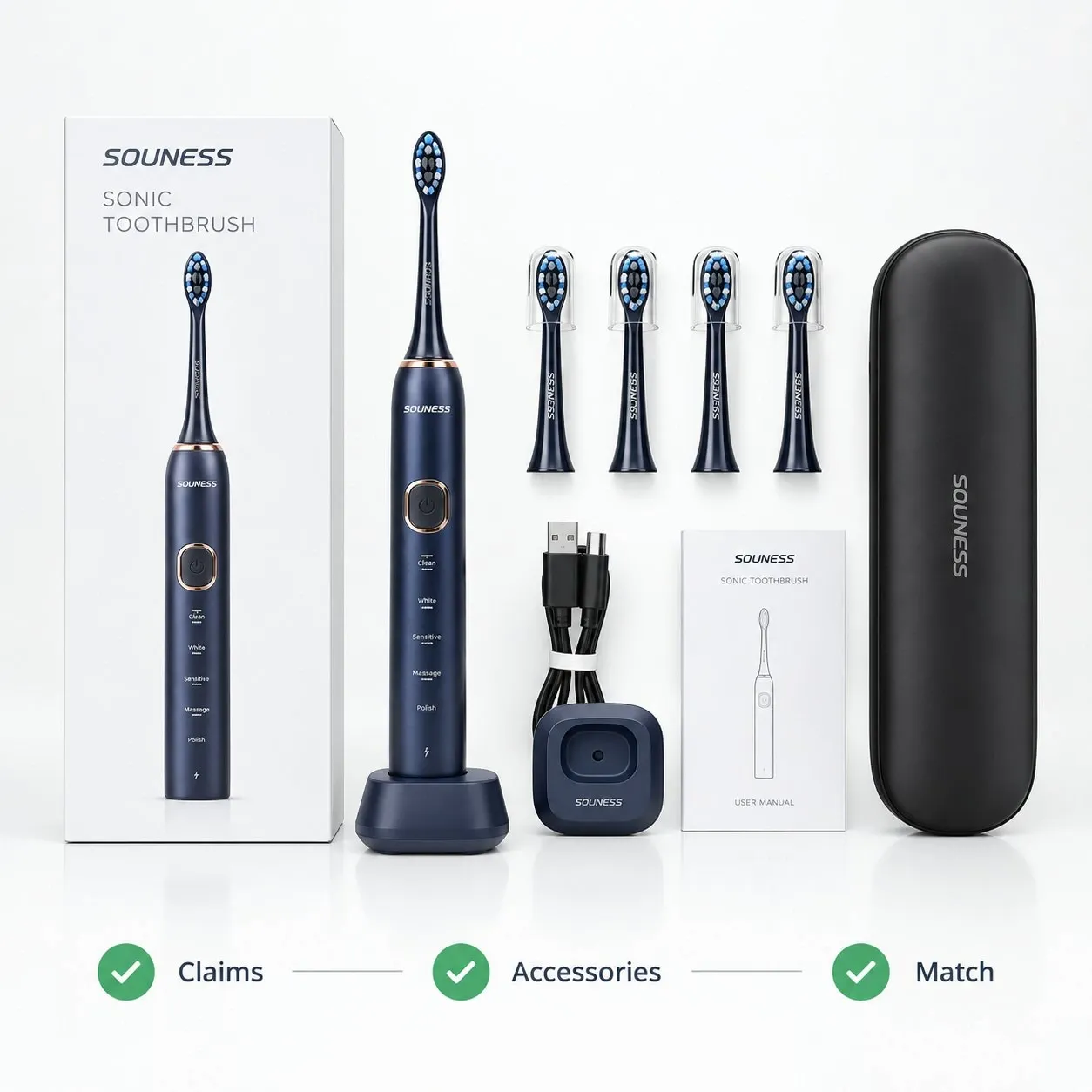
Printed technical statements should correspond to the product actually being manufactured.
Examples include:
A useful control chain is:
Technical Configuration
→ Approved Claim
→ Artwork Revision
→ Production Packaging
If the battery changes, an old runtime statement may need review.
If firmware changes the mode configuration, the printed mode list may need review.
If the charging accessory changes, product photography or charging information may also need review.
This is a sourcing-control principle rather than legal advice: technical statements printed on packaging should match the approved product configuration.
The technical configuration behind these claims is covered in Electric Toothbrush Battery & Charging Systems and Electric Toothbrush Motor, PCB & Firmware.
“What’s in the Box” is an easy place for packaging and production to become inconsistent.
A product may retain the same model number while its accessories change.
Examples include:
Before releasing artwork, compare the printed contents against:
The packaging should describe what will actually be supplied with that SKU and market version.
Packages that look almost identical may represent different sellable products.
Differences may include:
A small color stripe or icon should not be the only way production distinguishes them.
The packaging record should identify the relevant:
Retail barcodes, case barcodes and shipping labels may serve different purposes.
For packaging revision control, the important point is simpler:
Confirm that the barcode belongs to the exact SKU, pack quantity and market being produced.

One hardware platform does not automatically mean one universal packaging file.
Separate packaging versions may be required for:
Possible differences include:
The exact requirements depend on the target market and customer.
For this reason, the market should be identified in the packaging record rather than inferred from visual appearance.
An artwork revision changes what is printed.
Examples include:
A structural packaging revision changes the physical packaging.
Examples include:
A wording correction may require only an artwork revision.
A larger charging base, changed handle dimensions, new bundle or additional brush heads may require a structural revision as well.
Both should be identifiable.
Otherwise, the factory may use new artwork on an obsolete dieline or the latest box structure with old printed content.
The broader packaging system and structural options are covered in the Oral-Care Packaging Guide for OEM Projects.
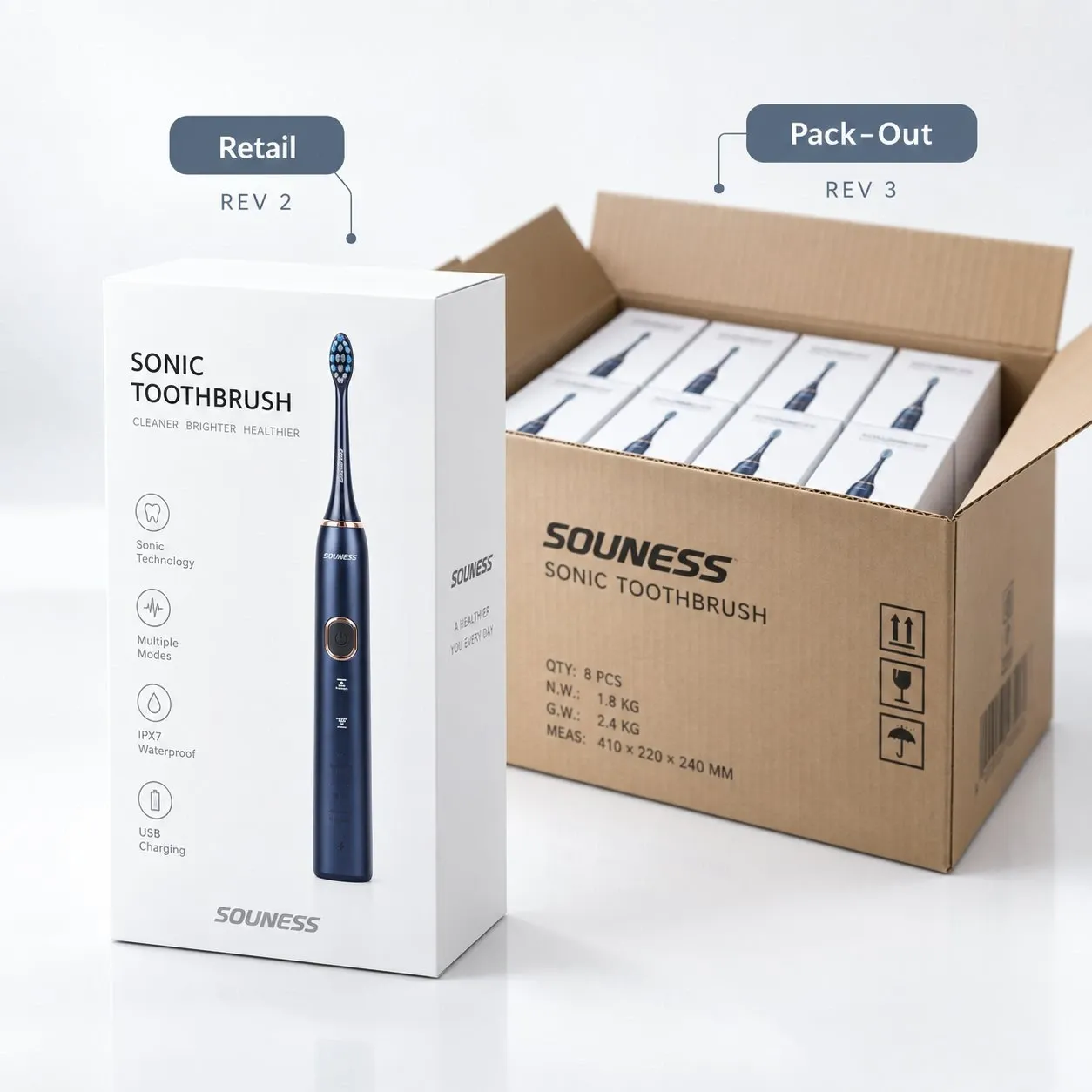
The retail package may remain unchanged while the shipment configuration changes.
Examples include:
Therefore:
Artwork Revision ≠ Pack-Out Revision
For projects where these elements change independently, it is useful to distinguish:
A pack-out change may affect:
even when the consumer-facing box has not changed.
The shipment-side configuration is covered in Master Carton & Transit Packaging for Oral-Care OEM Orders.
When a packaging revision changes, old printed inventory may remain at:
It should not remain available for uncontrolled production use.
Possible decisions include:
The key question is:
Can the old packaging still be used accurately with the current product configuration and market?
If the answer is no, the old version should be separated from active packaging inventory.
Approving Rev. B does not automatically define when Rev. A stops being used.
The transition should be clear.
Useful records may include:
There is no universal transition period.
The important point is to identify where the old version ends and the new version begins.
This reduces the risk of:
Mixed revisions can occur when:
Useful buyer questions include:
Depending on the supplier’s process, controls may include:
These are control points buyers can ask about, not assumptions about any specific factory’s internal process.
A packaging sample is useful only if the buyer knows what it represents.
The approval record should connect the sample to:
Where relevant, it may also reference the current pack-out.
A photo of a box without revision identification can still show appearance and print quality, but it is a weaker reference for future repeat orders.
How packaging samples are reviewed and approved is covered in Packaging Sample Approval for Oral-Care OEM Projects.
The golden sample and packaging revision should support each other.
The physical golden sample may show:
The associated records can identify:
**Product Revision
This allows the buyer to distinguish between:
“the approved product”
and:
“the approved product with the correct market packaging, accessories and shipment configuration.”
How the golden sample itself is approved and frozen is covered in Golden Sample Approval for Oral-Care OEM Projects.
Not every engineering change affects packaging.
But a material product change should trigger a Packaging Impact Review.
Examples include:
Ask:
The objective is not additional paperwork.
It is to prevent an approved technical change from creating outdated packaging.
How component and engineering changes are controlled is covered in BOM & Engineering Change Control for Electric Toothbrush OEM Projects.
A simple spreadsheet is often enough to control multiple packaging versions.
For example:
| SKU | Market | Product Rev. | Artwork Rev. | Box / Dieline Rev. | Pack-Out Rev. | Status |
|---|---|---|---|---|---|---|
| SKU-A | US | Rev. B | Artwork 03 | Dieline 02 | Pack-Out 04 | Approved |
| SKU-A | EU | Rev. B | Artwork 04 | Dieline 02 | Pack-Out 04 | Approved |
| SKU-B | UK | Rev. A | Artwork 02 | Dieline 01 | Pack-Out 03 | Approved |
These are illustrative placeholders, not AileCare product records.
The matrix should remain simple enough to answer:
This is especially useful when the same product platform is sold in multiple markets or customer programs.
Before releasing packaging production, confirm:
The production instruction should not simply say:
“Use the same packaging as last time.”
It should identify the packaging version approved for the current order.
| Common Mistake | Better Approach |
|---|---|
| Naming every file “final” | Use a name that identifies SKU, market, packaging type and revision |
| No packaging revision | Assign an identifiable version to the approved packaging |
| Same artwork used automatically for different markets | Maintain market-specific packaging records |
| Barcode updated without checking SKU | Confirm barcode, SKU, pack quantity and market together |
| Product changed but printed claims were not reviewed | Perform an artwork-impact review after material changes |
| Accessory changed but “What’s in the Box” remained old | Compare printed contents with the approved configuration |
| Dieline changed without linking artwork | Track printed and structural revisions separately |
| Retail box changed but master-carton labels remained old | Review pack-out and carton labels separately |
| Old packaging entered new production | Decide the old-stock status before releasing the new revision |
| New revision has no effective lot | Define where the old revision ends and the new one begins |
| Packaging sample has no version reference | Link sample approval to SKU, market and revision |
| Supplier prints an obsolete file | Release one identified production file and confirm obsolete-file control |
| Field | Confirm Before Packaging Release |
|---|---|
| Product / SKU | Correct sellable variant |
| Market | Correct destination or customer version |
| Product Revision | Matches the current approved product |
| Artwork Revision | Correct released print file |
| Structural / Dieline Revision | Correct box, insert or tray |
| Barcode | Correct SKU, pack quantity and market |
| Claims | Match the current technical configuration |
| Accessory List | Matches actual packed contents |
| Retail Pack Quantity | Matches the sellable SKU |
| Pack-Out Revision | Matches the current shipment configuration |
| Master-Carton Label Revision | Matches SKU, quantity and routing requirements |
| Approval Date | Shows which version has been released |
| Effective Production Lot | Defines where the revision starts |
| Old Stock Status | Valid, reserved, relabeled, scrapped or blocked |
| Approved Sample Reference | Links the physical sample to the documented version |
A repeat order should not rely only on:
“same packaging as last time.”
It should use an identifiable, approved packaging revision tied to the current product and market configuration.
If you are preparing a repeat oral-care OEM order, confirm the product revision, artwork version, accessories, barcode, structural packaging and pack-out revision before packaging production is released.
A packaging revision is an identifiable approved version of artwork, retail packaging, labels or related packaging records.
It helps buyers and suppliers distinguish the current production version from previous ones.
A revision may change because of updated claims, accessories, barcode, market information, packaging structure or shipment configuration.
Not necessarily.
Artwork revision normally refers to printed content such as copy, images, barcode, claims and graphics.
Structural packaging can change independently through a new dieline, insert, tray, dimensions or material. Pack-out can also change independently.
For projects where these elements change separately, buyers should identify each revision rather than treating all packaging as one version.
A material product change should trigger an artwork-impact review when it could affect printed information, accessories, images, compatibility or claims.
Examples include battery, charger, firmware, motor, brush-head, accessory or bundle changes.
The review does not automatically mean new artwork is required. It determines whether the existing artwork remains accurate.
It can be used if it still accurately represents the approved product and market configuration.
If it contains outdated claims, accessories, barcode, compatibility information or other incorrect content, the buyer and supplier should decide whether it will be reserved, appropriately relabeled, scrapped or blocked from production use.
Maintain a packaging record for each relevant SKU and market.
Useful fields include market, artwork revision, barcode, language, accessories, structural packaging revision and any customer-specific configuration.
This helps prevent similar-looking market versions from being mixed during printing or production.
Confirm the SKU, product revision, target market, artwork revision, structural packaging revision, barcode, printed claims, accessories, retail pack quantity, pack-out revision, master-carton labels, old packaging inventory and effective production lot.
This review should happen before printing or packaging production is released.
Release one clearly identified production artwork file for each SKU and market and record its revision in the packaging approval or production-release record.
Also ask how the supplier separates active and obsolete files and printed inventory.
Packaging sample approval and first-production checks can provide additional confirmation that the current version is being used.